







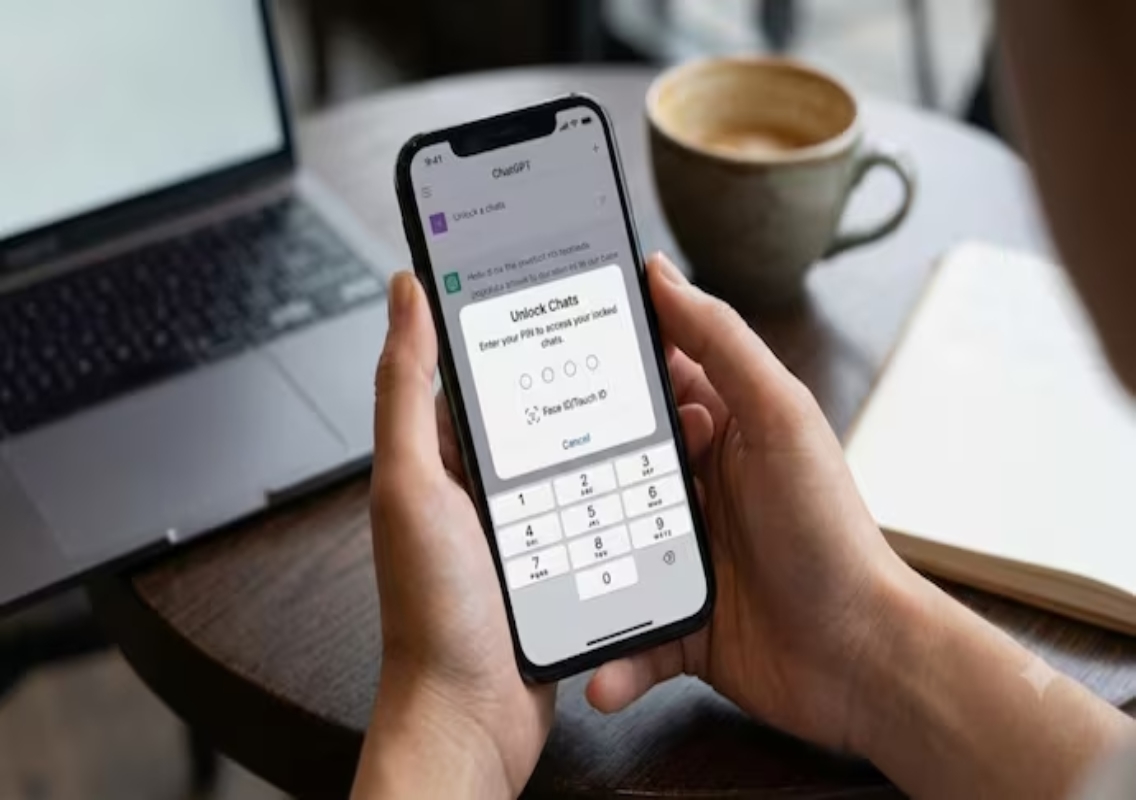


New Delhi: OpenAI has introduced a Locked Chats feature for ChatGPT that allows users to protect sensitive conversations with a custom four-digit PIN or biometric authentication, including Face ID and Touch ID on supported devices. The feature is designed to help users keep personal conversations away from others who may briefly access their phones or computers.
The feature is being rolled out across ChatGPT’s web version, desktop applications for Mac and Windows, and mobile applications for Android and iOS. It is expected to reach users across most subscription plans, including the Free tier, although availability may vary during the rollout.
The update offers an additional layer of privacy for people who use ChatGPT to discuss personal matters, organise confidential information or plan surprises. However, OpenAI’s reported feature details make an important distinction: locking a conversation hides it from the regular interface but does not provide end-to-end encryption or change the underlying data-retention arrangements.
How the new ChatGPT Locked Chats feature works
Once a user locks a conversation, it disappears from the standard chat history displayed in the sidebar. The conversation is also hidden from pinned chats and ordinary chat search results.
Instead, the locked conversation is moved to a dedicated Locked Chats section, which users can access after completing the required authentication. This arrangement allows people to retain their conversations without displaying them alongside their everyday chats.
Users can reportedly choose a custom four-digit PIN or use supported biometric authentication methods. Face ID and Touch ID availability depends on the device and platform.
The feature could be useful when someone lends their phone or laptop to a family member, friend or colleague. A person who opens ChatGPT would not immediately see the locked conversation in the usual chat list.
Unlike a feature that permanently deletes conversations, Locked Chats is designed to preserve access to saved discussions. Users can return to these conversations after unlocking the protected section.
However, users should remember that hiding a conversation from the interface is not the same as making its contents inaccessible through every possible route or securing the data with a separate encryption system.
Locked Chats differs from Temporary Chats
ChatGPT already offers Temporary Chats, which allow users to start conversations that do not appear in their regular chat history. Locked Chats serves a different purpose.
Temporary Chats are intended for conversations that users do not want added to their normal history. They eventually disappear under the service’s applicable retention rules.
Locked Chats, by contrast, are intended for conversations users want to keep but protect from casual viewing. The discussion remains saved and can be accessed again after authentication.
This distinction gives users two different approaches to managing privacy. Someone asking a one-off question may prefer a Temporary Chat, while a person who needs to retain a sensitive conversation may find the locking option more appropriate.
The choice depends on whether the priority is avoiding a conversation in the regular history or preserving it behind an additional access barrier.
Separate memory for locked conversations
One of the notable aspects of the reported update concerns ChatGPT’s Memory feature.
When Memory is enabled, Locked Chats reportedly receive a separate memory space shared among the locked conversations. Information from new messages in those conversations can update this private memory without updating the user’s regular ChatGPT memory.
The separation is intended to reduce the likelihood of details discussed in a locked conversation appearing unexpectedly in ordinary conversations.
For example, someone might use a locked chat to plan a surprise celebration or discuss a personal project. Keeping the associated memory separate could help prevent those details from influencing responses in unrelated conversations.
There is an important limitation, however. Locking a conversation does not automatically remove information that ChatGPT had already remembered before the conversation was locked.
Users who want to manage information already stored in Memory should review the relevant memory settings separately. Locking a chat should not be treated as a substitute for managing previously saved information.
What happens if users forget their PIN?
Users should pay particular attention to the PIN recovery process.
According to the India Today report, resetting a forgotten PIN can permanently delete the locked chats, hidden files and private memories protected by the old PIN. The report states that this deletion cannot be undone and that customer support cannot restore the deleted content.
This makes it important for users to choose an authentication method they can reliably access and understand the consequences of resetting their PIN before activating the feature.
People who intend to store important information in locked conversations should also consider maintaining appropriate copies of essential material outside ChatGPT, where suitable and safe.
The reported deletion rule is a significant consideration because a privacy feature should not lead users to assume that protected information can always be recovered if they lose access.
Does locking a chat make it completely private?
No. The Locked Chats feature adds protection against casual access through the ChatGPT interface, but it should not be confused with end-to-end encryption.
According to the report, locking a conversation does not create a separate encrypted vault, change how the service stores data in the background or alter the period for which chat data is retained.
It also does not change the account’s existing “Improve the model for everyone” training setting. Users who want to understand or change their data-use preferences should review the relevant ChatGPT data controls separately.
The feature is therefore best understood as an additional access-control measure rather than a complete change to ChatGPT’s data security and privacy arrangements.
Users handling highly confidential business information, financial records or sensitive personal documents should continue to exercise caution and review the service’s applicable privacy settings and policies.
Who can use the feature?
The reported rollout covers ChatGPT on the web, Mac and Windows desktop applications, and Android and iOS mobile applications.
The feature is intended for users on almost all major plans, including Free, Go, Plus, Pro, Business, Enterprise and Edu. The report says it is not available on the ChatGPT for Healthcare plan.
Not every conversation can be locked. The reported restrictions exclude Temporary Chats, archived conversations, group chats, conversations created through shared links, chats containing scheduled tasks and conversations involving meeting recordings.
As the rollout began on October 20, 2026, some users may not see the option immediately. Availability may take several days to reach eligible accounts.
Users should check their ChatGPT interface for the option rather than assuming that the feature has already been activated on every device.
A useful privacy feature with important limitations
The introduction of Locked Chats gives ChatGPT users another way to manage personal conversations without deleting them from their accounts. PIN-based access, supported biometric authentication and separate memory handling could make the feature useful for everyday privacy needs.
However, its benefits depend on understanding what it does and does not protect. It hides conversations from the normal interface, but it does not introduce end-to-end encryption, change data-retention policies or automatically erase previously saved memories.
For users, the most sensible approach is to treat Locked Chats as an additional privacy measure, keep their authentication details safe and review their existing data settings. The feature may improve control over who can casually view conversations, but it should not be mistaken for a guarantee of complete confidentiality.