




AI tools are changing how designers explore fashion ideas, from early concepts to detailed visual presentations. A structured approach helps transform creative thoughts into clear design directions that can be reviewed, adjusted, and developed further. Using an AI image generator allows designers to visualize garments, experiment with styles, and communicate concepts before moving into production stages. By combining strong creative planning with detailed prompts and careful refinement, designers can build fashion concepts that reflect a clear identity, purpose, and visual language.
Build a Clear Fashion Concept Before Generating Images
Define the Collection Theme, Audience, Season, and Design Goal
Every fashion concept should begin with a clear foundation. Define the collection theme, target audience, season, and overall design objective before creating visuals. Consider whether the collection focuses on casual wear, luxury concepts, experimental designs, or functional clothing. Understanding the intended wearer and purpose helps guide decisions about silhouettes, materials, and styling. A defined concept gives AI tools stronger direction and helps ensure generated designs support the original creative vision.
Create a Mood Board for Colors, Materials, and Visual Direction
A mood board helps organize the visual identity of a fashion collection. Include references for colors, fabrics, textures, patterns, shapes, and overall atmosphere. These elements communicate the feeling behind the designs and provide a consistent direction during image creation. A well-prepared mood board can highlight whether the collection should feel modern, elegant, futuristic, or natural. This visual foundation helps maintain consistency and makes it easier to translate abstract ideas into specific design instructions.
Choose How the Fashion Concept Should Be Presented
The presentation style influences how viewers understand a fashion concept. Decide whether the designs should appear as runway visuals, editorial photography, product showcases, or conceptual illustrations. Consider the background, model presentation, camera perspective, and overall storytelling approach. A clear presentation format helps AI generate images that communicate the intended message. Choosing this direction early also ensures that the final visuals match the purpose of the collection, whether for inspiration, review, or design development.
Write AI Fashion Prompts With Specific Design Details
Describe Garment Type, Silhouette, Fit, and Construction Details
Detailed garment descriptions create more accurate fashion concepts when using an ai image generator. Specify the clothing type, silhouette, fit, structure, and construction features that define the design. Include details such as oversized proportions, tailored shapes, layered elements, sleeve styles, collars, closures, or unique design features. Clear instructions help the AI understand how the garment should look and function. The more precise the construction details are, the easier it becomes to evaluate whether the generated concept matches the original design intention.
Specify Fabrics, Textures, Patterns, and Color Palettes
Materials and colors strongly influence the character of a fashion design. Describe fabrics such as silk, denim, leather, wool, or lightweight textiles along with their expected textures and finishes. Include patterns, surface details, and specific color combinations to create a stronger visual direction. Consistent material descriptions help the AI produce designs with a more realistic appearance. A carefully defined palette also ensures that individual pieces within a collection share a connected visual identity.
Control Styling, Model Pose, Lighting, and Presentation Context
Fashion visuals depend on more than the garment itself. Define styling choices, model poses, lighting conditions, and the surrounding environment to create a complete presentation. For example, specify whether the image should feel like a studio photoshoot, fashion editorial, or runway showcase. Kling IMAGE 3.0 can be considered as part of a creative workflow where designers explore fashion concepts through structured visual instructions. Clear presentation details help communicate how the design should be experienced.
Refine Individual Ideas Into a Cohesive Fashion Collection
Generate Variations to Compare Silhouettes and Colorways
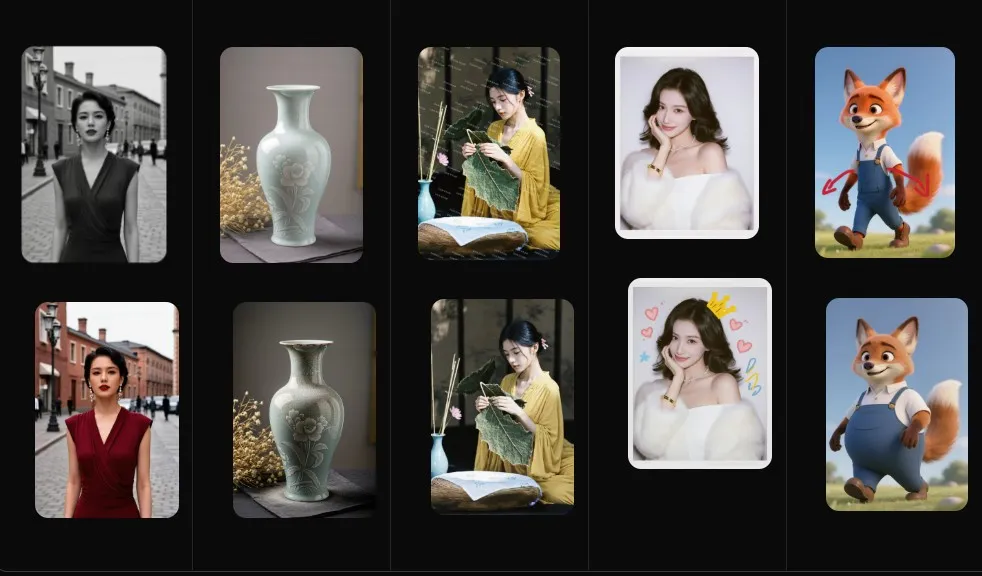
Creating multiple variations helps designers explore different possibilities before selecting final directions. Generate alternatives with changes to silhouettes, proportions, colors, or styling details while keeping the main concept consistent. Comparing variations makes it easier to identify the strongest design elements and understand how small changes affect the overall appearance. This process supports creative exploration while maintaining a clear connection between individual pieces and the broader collection theme.
Use References and Consistent Prompts Across Multiple Looks
Consistency across multiple fashion looks requires stable references and structured prompts. Maintain the same descriptions for important elements such as style, mood, materials, and visual presentation while changing individual garments or concepts. Reference images can reinforce the intended identity and reduce unwanted differences between generations. A consistent prompt system allows designers to create a collection that feels connected rather than a group of unrelated designs.
Review Design Details and Refine Concepts Before Development
Before moving from concepts to development, review each generated design carefully. Examine garment structure, fabric appearance, proportions, styling choices, and alignment with the original theme. Identify details that need adjustment and refine prompts to improve the concept. This review stage helps separate strong ideas from less practical options. Careful refinement ensures that AI-generated fashion concepts become clearer, more cohesive, and more useful for future design decisions.
Conclusion
AI image generation provides fashion designers with a powerful way to explore concepts, visualize ideas, and develop cohesive collections. Strong results come from combining clear creative goals, detailed prompts, consistent references, and thoughtful refinement. By defining themes, materials, presentation styles, and design details before generation, creators can build more meaningful visuals. A structured workflow helps transform early ideas into organized fashion concepts that support creativity, communication, and future development.