


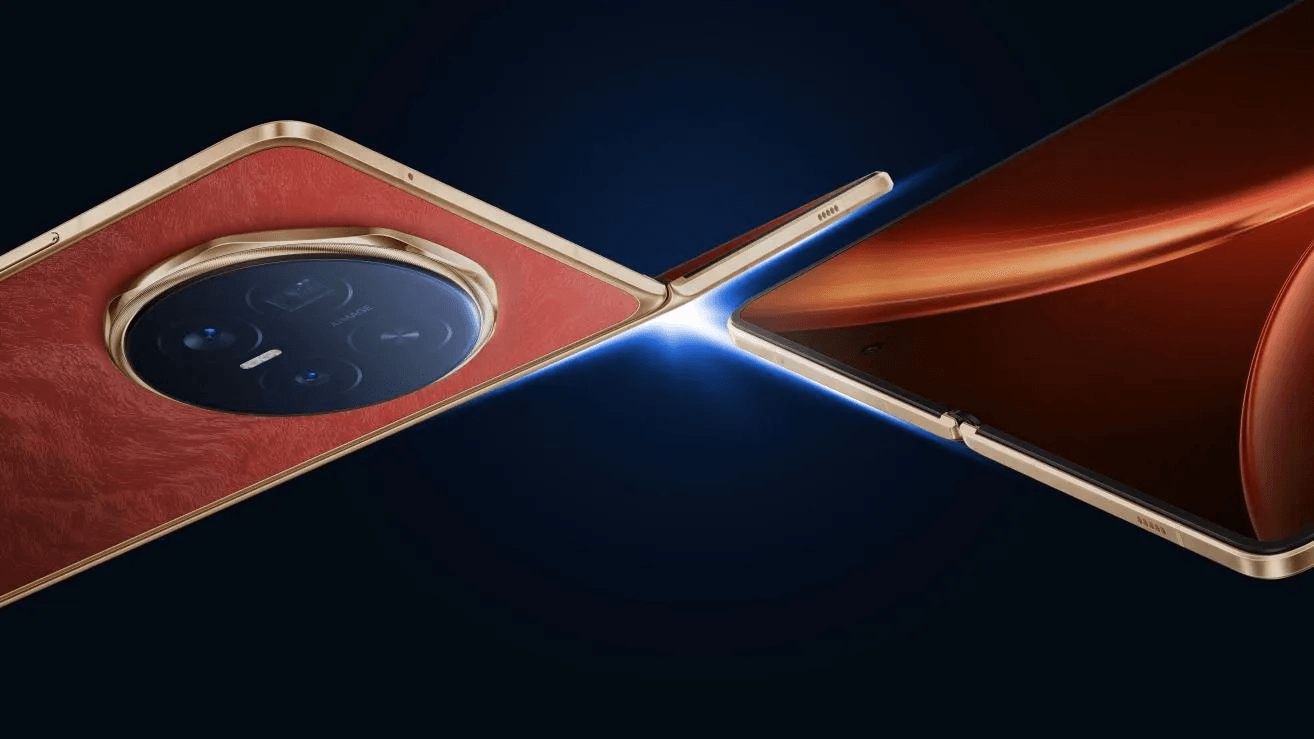


HONOR Magic V6 gives you two ways to view content, and each one can be tuned for a better daily experience. The outer screen is practical for quick checks, messages, and one-handed use, while the inner foldable display opens up more space for reading, streaming, gaming, and multitasking. To get the best results, it helps to adjust a few key settings instead of relying only on defaults. Brightness, color behavior, refresh rate, and eye comfort options all affect how the screen feels throughout the day. This guide explains what makes the display impressive and how to optimize it for comfort, clarity, and productivity, so every glance, scroll, and split-screen task feels smoother and easier on your eyes.
What Makes the HONOR Magic V6 Display Stand Out?
Inner Foldable Screen and Outer Display Features
The display setup is designed to match different ways people use a foldable phone. Inside, the 7.95-inch foldable OLED screen gives you a large canvas for documents, videos, ebooks, and side-by-side apps. Outside, the 6.52-inch OLED display keeps everyday tasks quick and convenient without opening the phone. Both screens support 1.07 billion colors, which helps photos, interfaces, and video look rich without appearing flat. HONOR also includes eye comfort features such as AI Defocus Display, Dynamic Dimming, Circadian Night Display, and Nature Tone Display. For durability, the inner panel uses HONOR Super Armored Inner Screen, while the outer screen is protected by HONOR Anti-scratch NanoCrystal Shield for more confident daily handling.
Screen Clarity, Brightness, and Smooth Scrolling
A good viewing experience depends on sharp detail, readable brightness, and fluid movement, and this display combination covers all three well. The inner screen resolution of 2352 x 2172 keeps text crisp and images clean on the larger panel, while the outer screen resolution of 2420 x 1080 maintains solid clarity for everyday use. Bright environments are less of a problem because the inner screen reaches up to 5000 nits HDR peak brightness and 1300 nits global peak brightness, while the outer display goes up to 6000 nits HDR peak brightness and 2000 nits global peak brightness. Scrolling also feels smoother, helping social feeds, web pages, and app navigation look more responsive and visually consistent.
How to Optimize HONOR Magic V6 Display Settings
Adjust Brightness, Color, and Refresh Rate
Start with brightness settings because they have the biggest effect on comfort and visibility when using the HONOR Magic V6 in Oman. Use auto brightness for most situations, then raise it manually only when strong sunlight makes the screen harder to read. For color, choose the mode that feels most natural for your eyes rather than the most saturated option. Features like Nature Tone Display can help the screen adapt more gently to surrounding light. Refresh rate matters too. A higher setting makes scrolling, animations, and gaming feel smoother, while a more balanced option can reduce power use during lighter tasks. The best setup for the HONOR Magic V6 in Oman is simple: bright enough to stay clear, natural enough to stay comfortable, and smooth enough to feel effortless.
Set Up Eye Comfort and Night Viewing Modes
Night viewing feels better when you reduce visual strain before your eyes become tired. Turn on eye comfort features in the evening and keep them scheduled, so the display changes automatically instead of forcing you to adjust it every night. Circadian Night Display is especially useful because it supports a warmer, more sleep-friendly viewing style after dark. Dynamic Dimming can also make prolonged screen time feel less harsh, and AI Defocus Display adds another layer of visual comfort for reading or browsing. If you often use the phone in bed, lower brightness manually even after enabling these tools. That combination usually creates a softer, steadier image that feels easier to watch for longer periods.
How to Get More From the HONOR Magic V6 Foldable Screen
Improve Video Streaming, Reading, and Gaming
The foldable screen becomes most useful when you match the display to the activity. For video streaming, open the inner screen and increase brightness only as much as the room requires, since excessive brightness can wash out darker scenes and tire your eyes faster. For reading, combine moderate brightness with eye comfort settings to make long sessions easier. The larger panel also helps magazines, PDFs, and web articles feel less cramped. For gaming, use the smoother display setting and keep touch interactions unobstructed by disabling unnecessary overlays or alerts. A clean setup improves focus and immersion. Small adjustments like these make the foldable display feel more purposeful, not just bigger, during entertainment and everyday content use.
Use Split-Screen and Multitasking for Daily Tasks
A large foldable display is not only for media; it is also ideal for getting routine tasks done faster. Open the inner screen when you need to compare information, reply while reading, or keep one app visible while working in another. Features such as Smart Multi-window, One-swipe Split, Horizontal Split, and App Extender make this easier to set up without digging through menus. A practical approach is to pair communication apps with notes, maps with messages, or a browser with a document. Keep each window large enough to read comfortably instead of forcing too many apps onto the screen at once. Used well, split-screen turns spare moments into productive ones without making the interface feel crowded.
Conclusion
Getting the best viewing experience from HONOR Magic V6 comes down to using its two displays with intention. The outer screen is ideal for speed and convenience, while the inner panel delivers the space needed for immersive viewing and efficient multitasking. Once you fine-tune brightness, color behavior, refresh rate, and eye comfort options, the display feels more natural across different lighting conditions and daily tasks. The most effective setup is not the brightest or most vivid one at all times. It is the one that stays clear in daylight, comfortable at night, and flexible enough for reading, streaming, gaming, and work. With a few smart adjustments, the screen becomes easier on your eyes and more useful from morning through late evening every day.